
Comparison
A Sight Reading Factory alternative built for piano
Sight Reading Factory is a well-known tool for generating sight-reading exercises. If you play piano and want a step-by-step path where every note you play is checked via MIDI, Notimo might suit you better. Here’s an honest comparison.
- Free to start
- In your browser
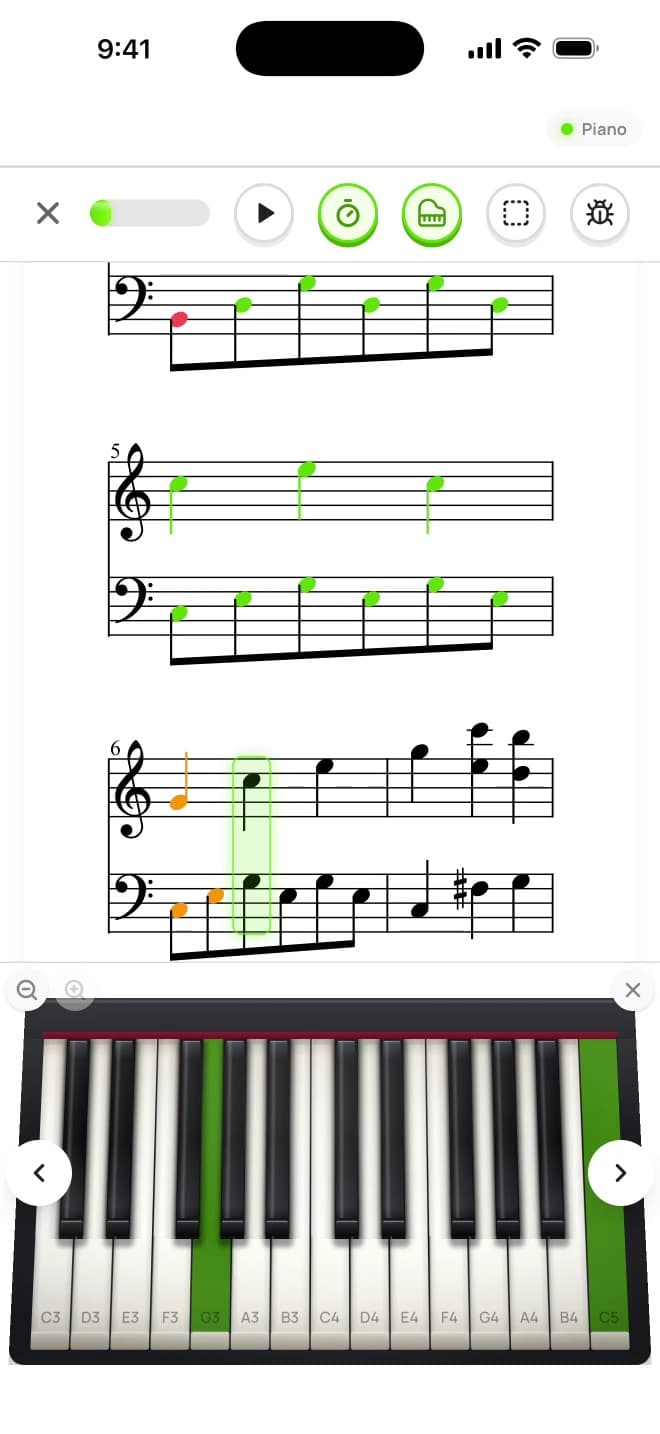
- Instant feedback
- MIDI keyboard support

The short answer
We build Notimo, so keep that in mind — we’ll still be fair. Both tools help you read music you’ve never seen before. They just solve different problems.
As of November 2026. For Sight Reading Factory’s current features and prices, please see their own website — they can change at any time.
- You teach a band, choir or orchestra and need exercises for many instruments → Sight Reading Factory is built for that.
- You play piano and want the app to check what you actually play → Notimo.
- You want a structured path from your first note to fluent two-hand reading → Notimo.
- You just need a printable exercise right now → use our free sight-reading generator (no account needed).
Generating exercises vs. training the skill
An exercise generator gives you endless new music to read. That’s valuable — fresh material is the core of sight-reading practice. Just as important is feedback: reading on your own, it’s easy to miss your own mistakes — a wrong note in the bass clef, a rushed half note, a key signature you forgot.
Notimo checks every note while you play. On a MIDI keyboard or the on-screen piano, every note is marked right or wrong in real time, and timing is checked against the beat. Over time Notimo notices which notes you still confuse and brings them back more often.
Notimo at a glance
What you get when you practise sight-reading with Notimo:
- 610 lessons and 600 technique exercises across 6 levels — treble, bass and both clefs together
- Real-time feedback on pitch and timing via USB/Bluetooth MIDI, right in the browser
- Weak-note analysis that drills exactly the notes you still mix up
- Rhythm, interval, scale and key-signature training next to sight-reading
- Note names in 12 systems, including German H and Solfège; in the browser and as an app for iPhone, iPad and Android
Where Sight Reading Factory is the better choice
Being honest: if you play an instrument other than piano, sing in a choir, or teach an ensemble, a multi-instrument generator covers far more ground than Notimo. Notimo is piano-only by design — that focus is what lets it check every note you play.
A simple routine that works with either tool
Five to ten minutes a day beats an hour on Sunday:
- Scan first: key signature, time signature, the highest and lowest note.
- Clap or tap the rhythm once before you play.
- Pick a slow tempo and don’t stop for mistakes — keep the pulse.
- Read one new short piece every day instead of repeating the same one.
Frequently asked questions
Is there a free Sight Reading Factory alternative?
Yes. Notimo is free to start in your browser, and our sight-reading generator creates printable piano exercises at no cost and without an account. Notimo Pro unlocks all lessons and training modes.
Does Notimo work for instruments other than piano?
No — Notimo is made for piano and keyboard. Its strength is checking what you play on a MIDI keyboard or the on-screen piano. For band, choir or strings, a multi-instrument tool is the better fit.
Do I need a MIDI keyboard?
No. You can start with the on-screen piano. A MIDI keyboard makes practice feel like the real thing, and Notimo connects to it directly in Chrome, Edge or Opera — nothing to install — or through the Notimo app on iPhone and iPad.
Can I use Notimo with my piano students?
Yes, as practice between lessons: pupils get feedback on every note at home instead of practising mistakes. Teacher features such as classes, assignments and a progress overview are not available yet.
Read music with instant feedback
Free, right in your browser. Your first sight-reading exercise takes less than a minute.